Summary
Building on my progression from legacy hardware to modern Windows, this stage focuses on formalising a lightweight, reproducible SOC Labs and AWS Labs environment in WSL2 + Ubuntu 24.04.
The objective was to freeze a minimum viable professional baseline: a curated, fully functional lab supporting structured Blue Team operations, controlled Red Team learning, and cloud security automation — organised into two main folders (SOC Labs and AWS Labs) following the same operational architecture.
1. Minimal, Verified Toolset
Every tool serves a defined purpose. No tool-maximalism.
Blue Team Essentials:
auditd, rsyslog, journalctl, tcpdump, htop, lynis, clamav
Note: auditd does not run natively under WSL2. After initial troubleshooting, I confirmed it as a known limitation and documented the constraint. Understanding environmental limits is part of disciplined lab design.
Red Team Learning Tools:
nmap, gobuster, nikto, sqlmap, hydra, nc, traceroute, dig
Used exclusively to improve defensive intuition and detection capability.
Cloud Security Tools:
AWS CLI v2, jq, Python3 + pip3, curl, openssl, Git
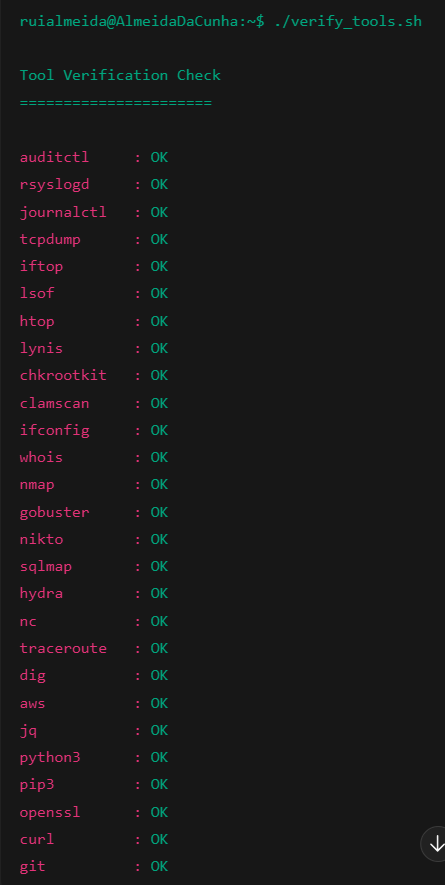
Verification was automated using a simple shell loop:
for tool in tcpdump htop lynis aws jq python3 pip3 git; do
  if command -v $tool >/dev/null 2>&1; then
    echo "$tool OK"
  else
    echo "$tool MISSING"
  fi
done
All critical tools returned OK, confirming a fully operational baseline.
2. Lab Architecture: Structured, Repeatable, Scalable
The environment is organised into two primary folders:
- SOC Labs
- AWS Labs
Both follow the same internal architecture:
1. Environment & Scope
2. Baselines
3. Attack Surface & Exposure
4. Logging & Visibility
5. Threats & Techniques
6. Detection & Analysis
7. Response & Hardening
8. Automation & Continuous Improvement
This ensures consistency across host-based investigations and cloud-based detection workflows.
WSL2 Advantages:
- Minimal RAM overhead
- Near-native SSD performance
- Clean Windows integration
- Easy snapshotting (
wsl --export/wsl --import)
Lab maintenance now takes minutes rather than hours, maximising time spent on security analysis.
Practical Learning & Automation Examples
CloudTrail Automation
Parsing logs with Python identified a misconfigured IAM role. Detection logic was automated across accounts using boto3 and jq.
Network Monitoring
tcpdump combined with filtering tracked SSH attempts and generated timestamped alerts stored under structured logging directories.
Web Security Analysis
nikto scans against a controlled lab service highlighted common HTTP header probes, informing defensive scripting improvements.
Each exercise produces reproducible outputs aligned with the Detection → Analysis → Hardening workflow.
4. Reflection and Career Relevance
By formalising this professional baseline, I:
- Verified tools under real-world constraints
- Structured SOC and cloud workflows using a repeatable architecture
- Reduced operational friction through disciplined environment design
- Produced artefact-driven outputs suitable for GitHub and portfolio review
The lab demonstrates systems thinking, controlled scope management, and deliberate skill compounding — qualities valued in remote SOC and cloud security roles.
Outcome
- Consistent Blue Team investigations
- Structured cloud detection and IAM analysis
- Defensive automation pipelines
- Verified, repeatable artefacts ready for professional review
This lab now forms a stable foundation for advanced SOC and cloud detection practice, aligned with remote-first security roles across the UK and EU.