
Building a Cloud Security Lab Environment: From Legacy Hardware to Identity-Centric Workflows
Summary
This portfolio demonstrates my ability to design stable, reproducible cloud security lab environments across legacy hardware, modern Windows, and WSL2. It combines hardware optimisation, Linux hardening, and cloud integration, producing portfolio-ready artefacts for professional and freelance contexts. The labs reflect a structured cloud security progression focused on identity security, access control, and cloud monitoring workflows.
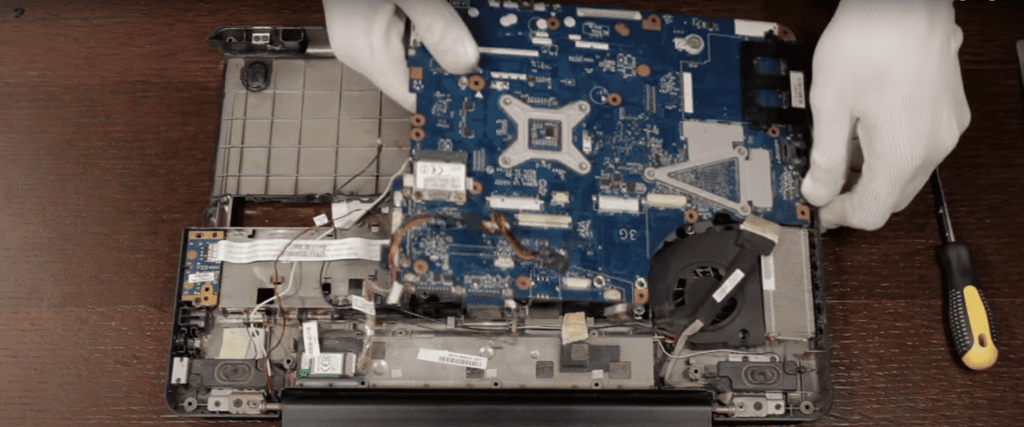
Legacy Hardware Recovery: Toshiba Laptop Lab
Hardware: Toshiba Satellite L500-13W (2009), 4 GB RAM, legacy BIOS, USB 2.0. The system initially suffered from overheating, a failing HDD, and keyboard misconfiguration, making it unsuitable for consistent lab work.
The environment was rebuilt by installing MX Linux 23 (Debian-based, lightweight, stable). The HDD was replaced with an SSD, and thermal issues were resolved to improve reliability and sustained performance.
Security and diagnostic tooling was installed, including nmap, Wireshark, tcpdump, Lynis, ClamAV, and OpenVAS, to support hands-on analysis and lab-based experimentation.
The outcome was a system with a sub-30-second boot time and stable thermal performance under sustained workloads. This setup enabled early-stage security lab development and foundational system administration practice, supporting progression toward cloud and identity-focused environments. It reinforced practical skills in Linux administration, hardware optimisation, and reproducible lab configuration.



Scaling Up: Windows 11 SOC Lab
Legacy hardware limited VM-based experimentation due to RAM, CPU, and storage bottlenecks, which restricted packet capture, cloud integration, and running multiple environments simultaneously.
The new setup uses an i7 CPU, 16 GB RAM, and SSD storage, providing significantly improved performance and stability for lab work.
This environment now supports running multiple security and cloud tools concurrently, enables hands-on identity and access management lab work alongside investigative workflows, and produces reproducible, portfolio-ready outputs suitable for GitHub and professional review.
WSL2 Cloud Security Lab Environment
WSL2 became the core lightweight lab environment after testing VirtualBox and VMware. It provides minimal RAM and CPU overhead with near-native performance and smooth integration with Windows, making it suitable for efficient cloud security lab work.
It supports CLI-based workflows and automation tasks used in cloud environments, including Python scripting and general infrastructure interaction, while maintaining a stable and reproducible setup for experimentation.
This environment improves efficiency by reducing system overhead and allowing more focus on security and identity-related lab work rather than environment maintenance.
Lab Architecture: Identity Security Lab Structure
The lab environment is organised into two structured areas focused on identity security and cloud environments. Both areas follow a consistent framework designed to support reproducible investigations and documentation of identity and access scenarios.
The primary focus of the labs is identity security in Microsoft environments, including Entra ID and Azure-based identity and access management concepts. This includes analysing identity posture, reviewing access configurations, and investigating authentication behaviour through structured scenarios.
The workflow incorporates log analysis, scripting, and basic automation to support investigation and documentation of identity-related events. This helps build consistent, repeatable methods for analysing access and authentication issues in cloud environments.
Each investigation or script is documented and stored as a GitHub repository, creating reproducible artefacts that demonstrate structured thinking, investigation discipline, and readiness for identity-focused cloud security roles.
Cloud and Identity Security Progression
This multi-stage lab journey strengthens my ability to diagnose and stabilise systems, optimise environments under constraints, and build reproducible lab setups for cloud security work.
It develops structured thinking for producing verifiable technical artefacts that support identity security and cloud-focused roles, particularly in Azure environments.
Overall, it supports progression toward roles involving identity and access management, cloud security operations, and investigation of authentication and access-related behaviour in enterprise systems.